
Anytime Fitness
Adding new features: a real-time member tracker; a personalized workout plan
Role - UX/UI Designer, Researcher
Tools - Figma, Whimsical
Duration - 8 weeks

Project Background
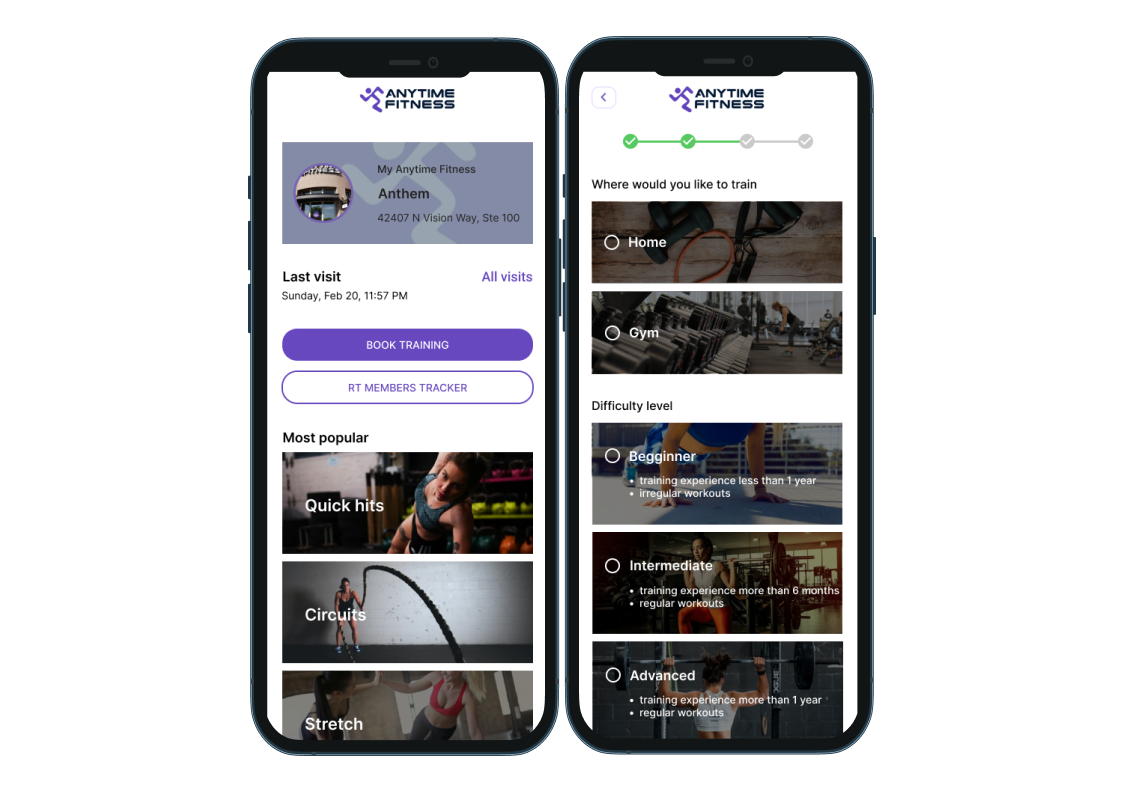
Anytime Fitness is the fastest-growing gym franchise in the world, with more than 3,000 gyms serving nearly 3,000,000 members on five continents. The Anytime Fitness App helps members to make healthy decisions by providing them with tools, like access to coaches, training plans, locations, and reserve gym time.
Problem
During the pandemic, many people stopped going to the gym, because they were worried about their health. People prefer to exercise in the gym there are fewer members. Right now, Anytime fitness members can not track how many people are in the gym through the application. Also, many people prefer to exercise at home, but they don't know where to start to improve their health and body shape.
Project Goals
Create a new component to the app - a real-time member tracker - an ability to see how many members are in the gym at the current time. The new component should help people choose the most convenient time to go to the gym
Add a virtual assistant to help members choose custom workouts based on the personal parameters, time, and equipment available
EMPATHIZE
Research Goals:
My main research goal was to find out what factors affect peoples' decisions to go to the gym, when they prefer to do it, and how they choose their workouts.
Research Methods:
Secondary Research. To gather and analyze data regarding fitness apps
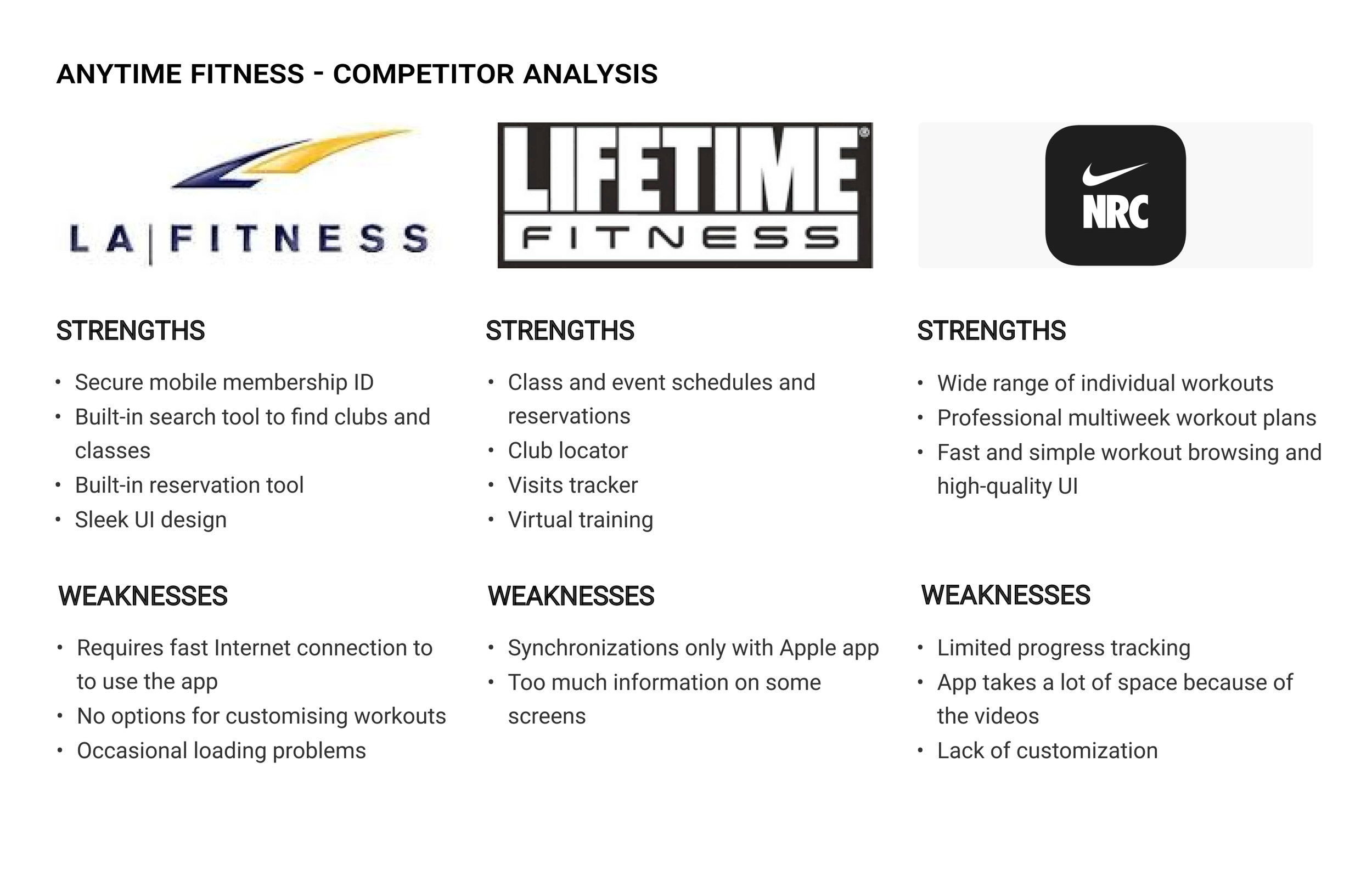
Competitive Analysis. Analyze the three most significant competitors on the market, their strengths, and weaknesses
1:1 In-person Interviews. To gain insights into how people use current fitness apps and their satisfaction with it
Competitive Analysis. The following competitors were analyzed for the secondary research: LA Fitness, Lifetime Fitness, and NRC.
According to my research, the main areas to focus on are: customization, integration with other devices, video tutorials, activity summaries by specific time period

Interview Participants. I interviewed 6 participants, between 22 and 43 years old, for the research. The goal was to determine what factors affect peoples' decisions to go to the gym, when they prefer to do it, and how they choose their workouts. Participant requirements: people who usually go to the gym 2 - 4 times per week; people who have used fitness apps before.
Research showed that participants prefer spacious gyms and fewer people in them. That is why a new component to the app - a real-time member tracker - will be a valuable feature for members. Members can quickly check and see how many people are in the gym at a specific time and decide what time suits them.
The research helped me to discover the most common pain points while using a fitness app:
Hard to read and follow instructions in the gym
Too slow loading time for a videos
Not enough flexibility in fitness app routine
Have to pay for using an app
How to improve a customer experience with the Anytime Fitness app:
Add customization before choosing a workout: gender, age, height, weight, workout plan, where to train (gym/home)
Increase text, buttons, and the box size
Add different types of workouts including, but not limited to, Meditation, Yoga, Stretch, Cardio, Circuits
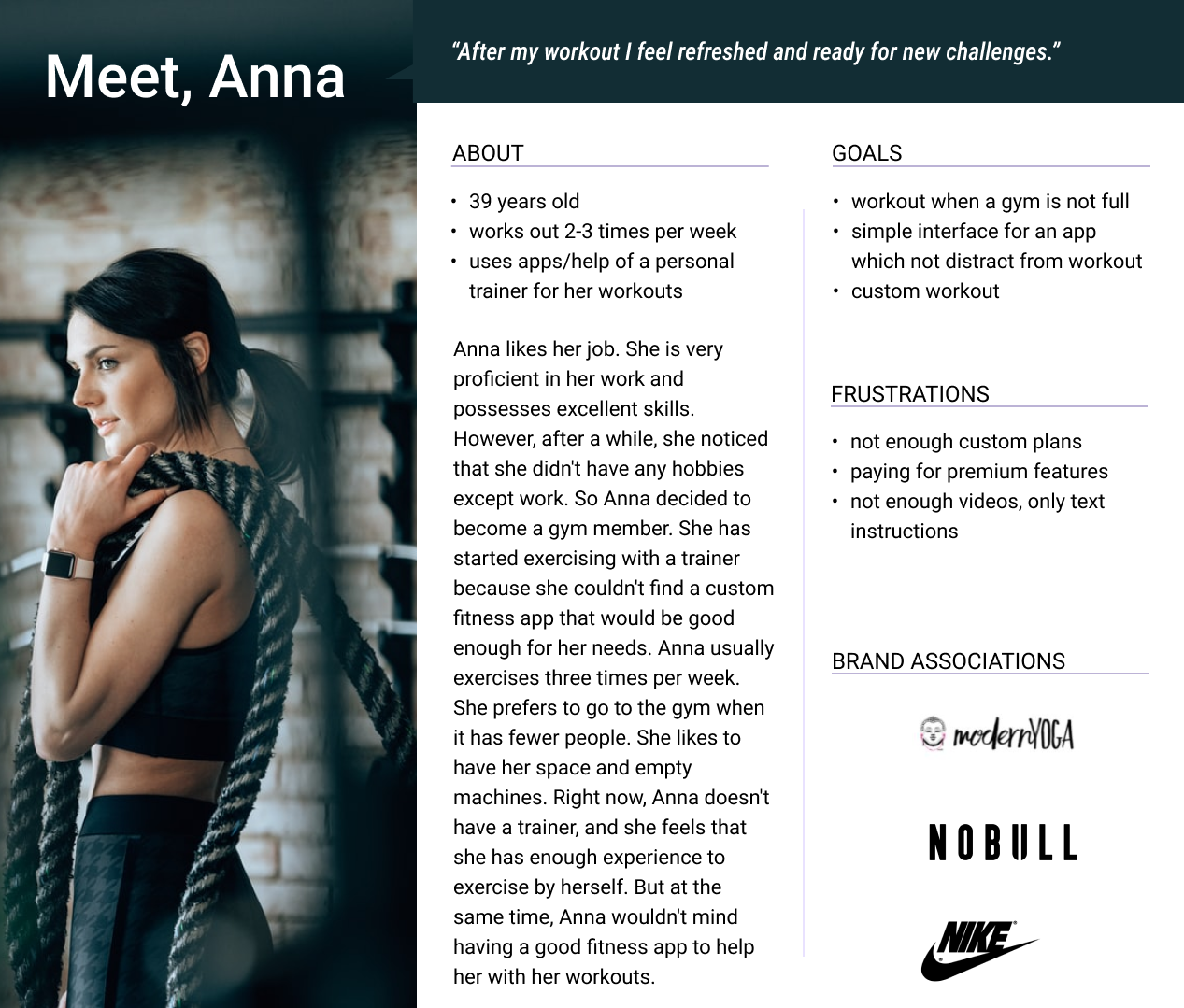
User Persona. After concluding the research, I created a Persona that would best reflect Anytime Fitness target audience

DEFINE
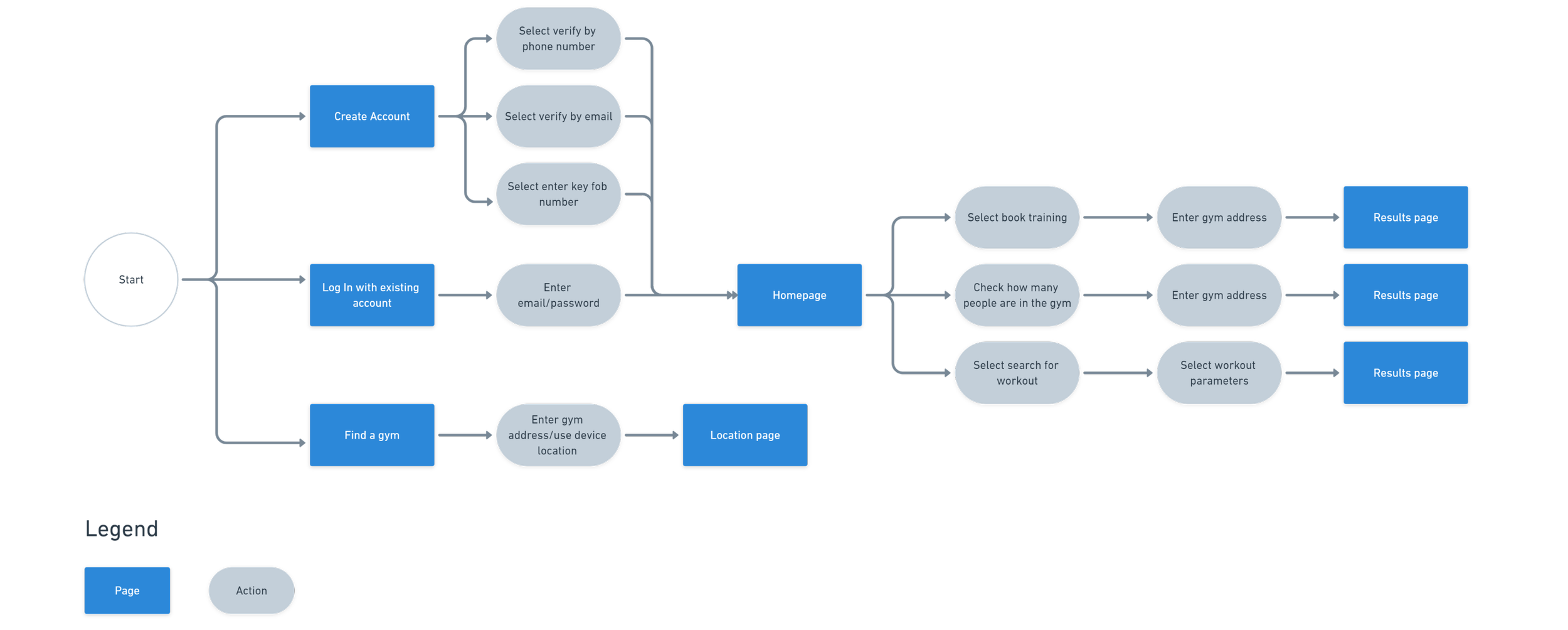
Information Architecture - Task Flow
Task: user wants to check how many people are in the gym and select the “simple yoga flow” workout

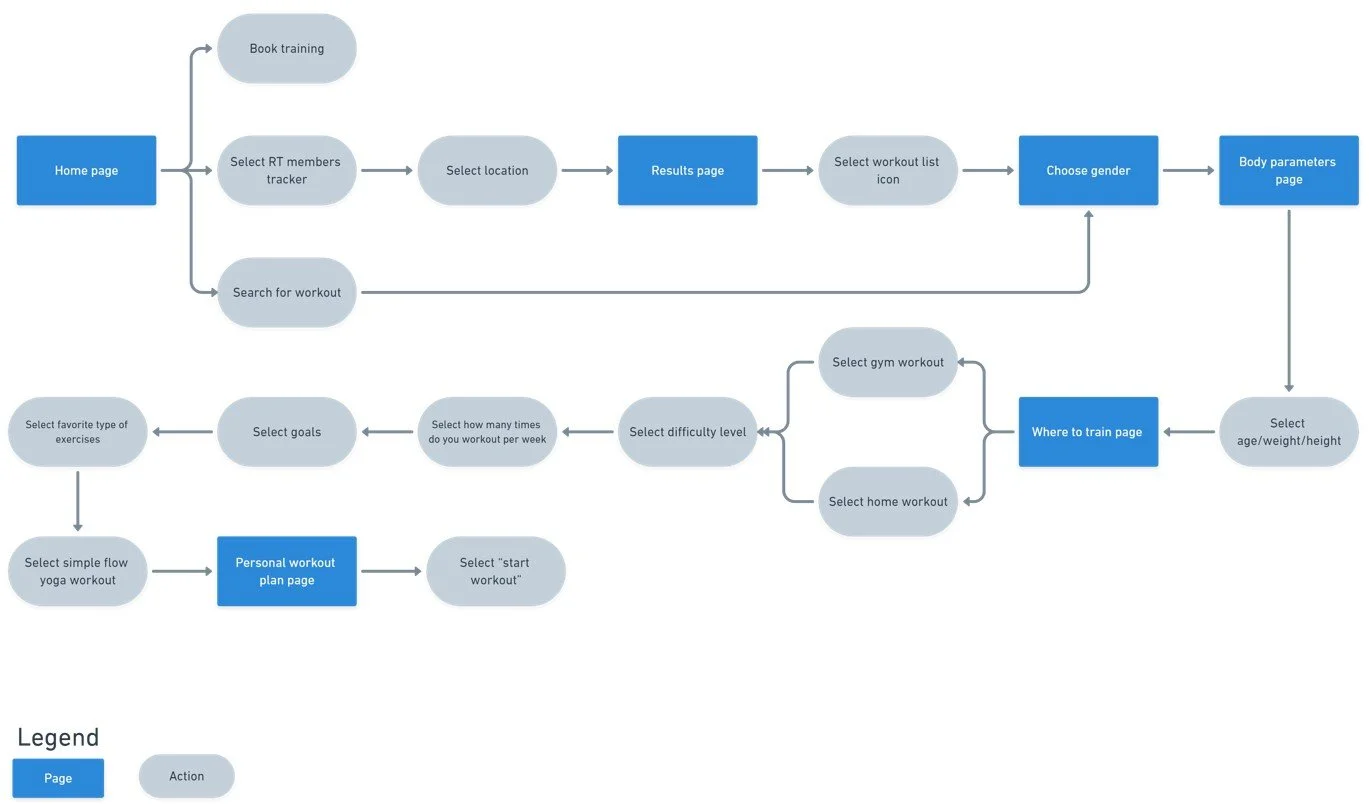
Information Architecture - User-Flow

IDEATE
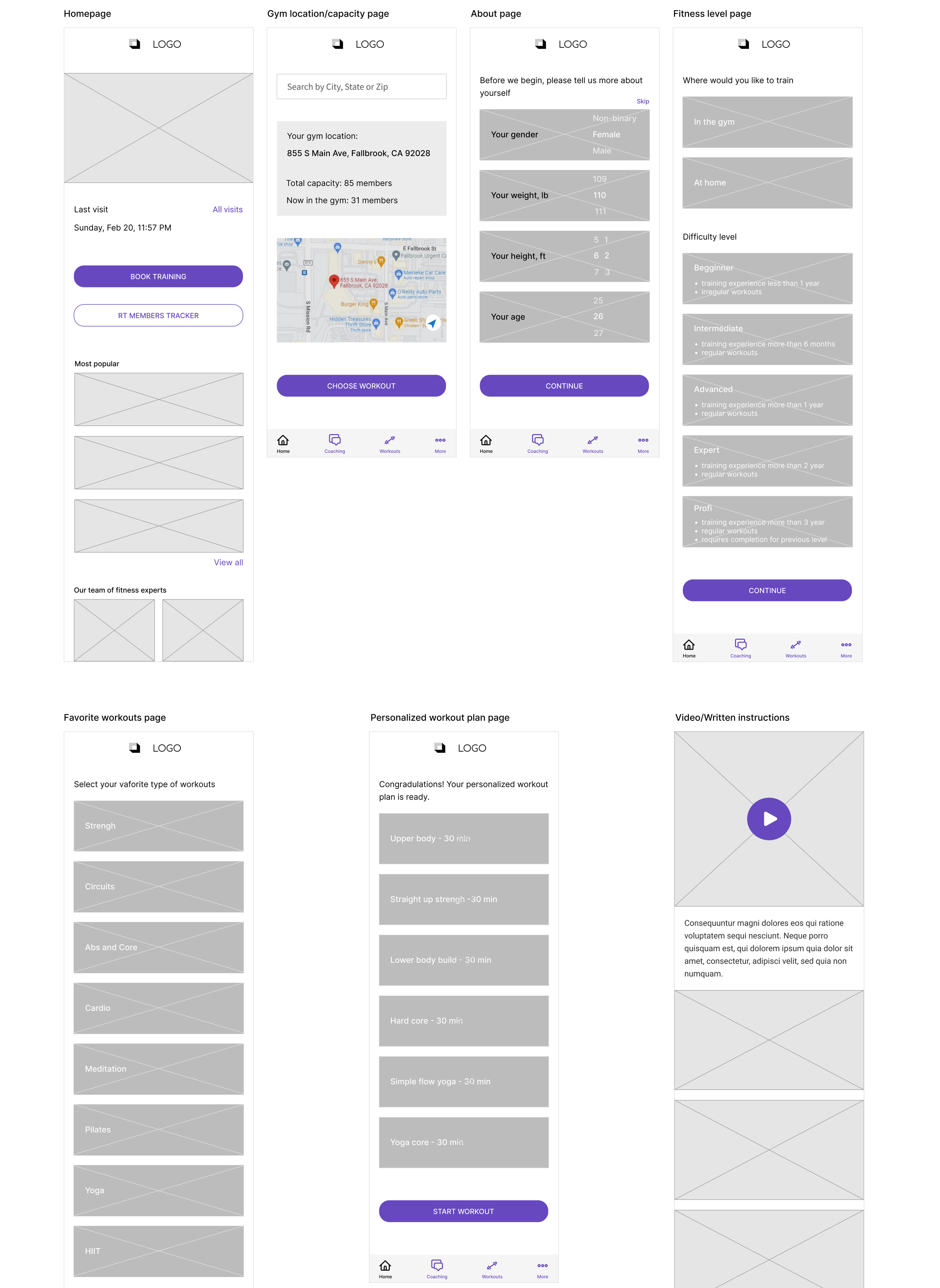
Low Fidelity Wireframes
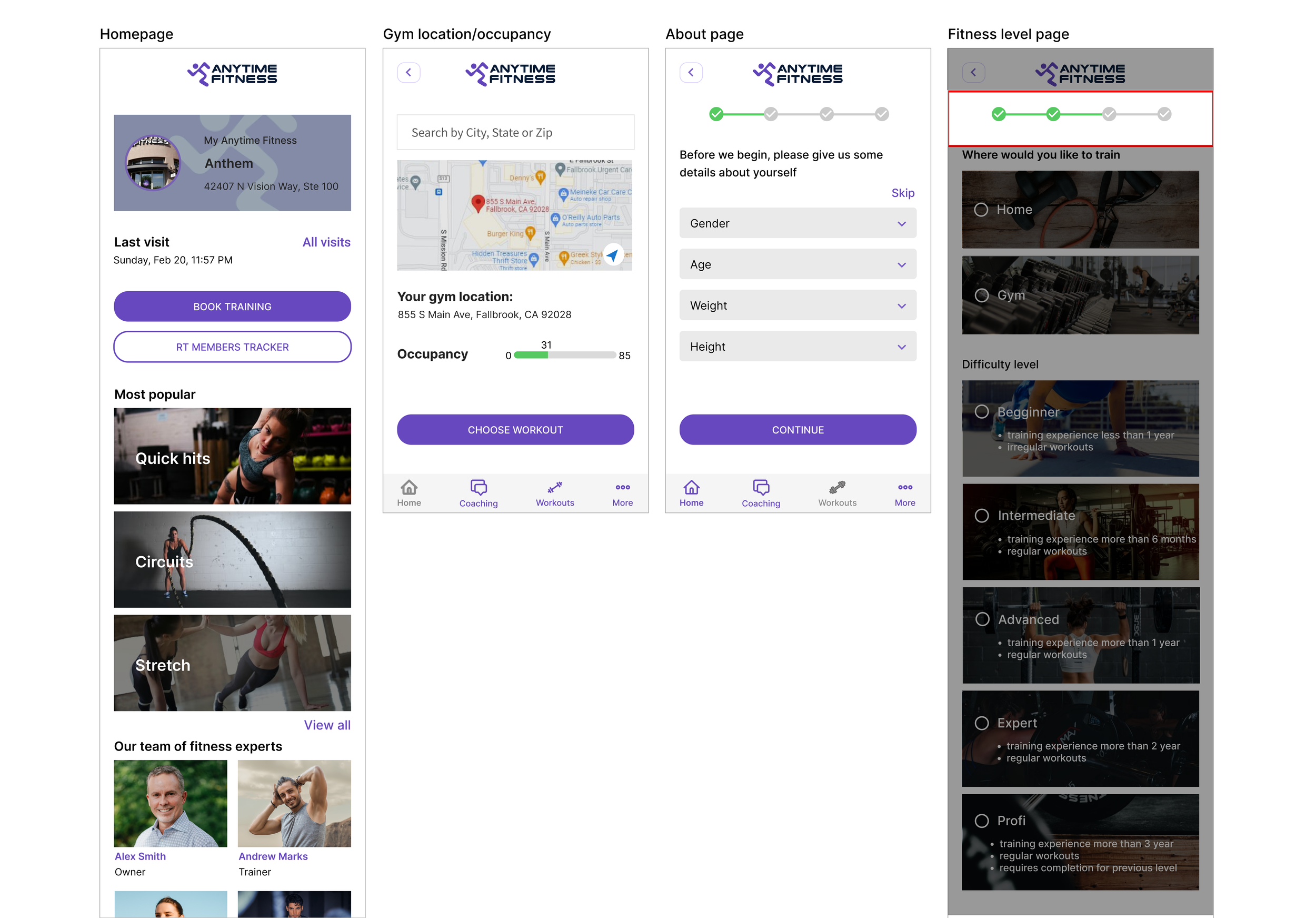
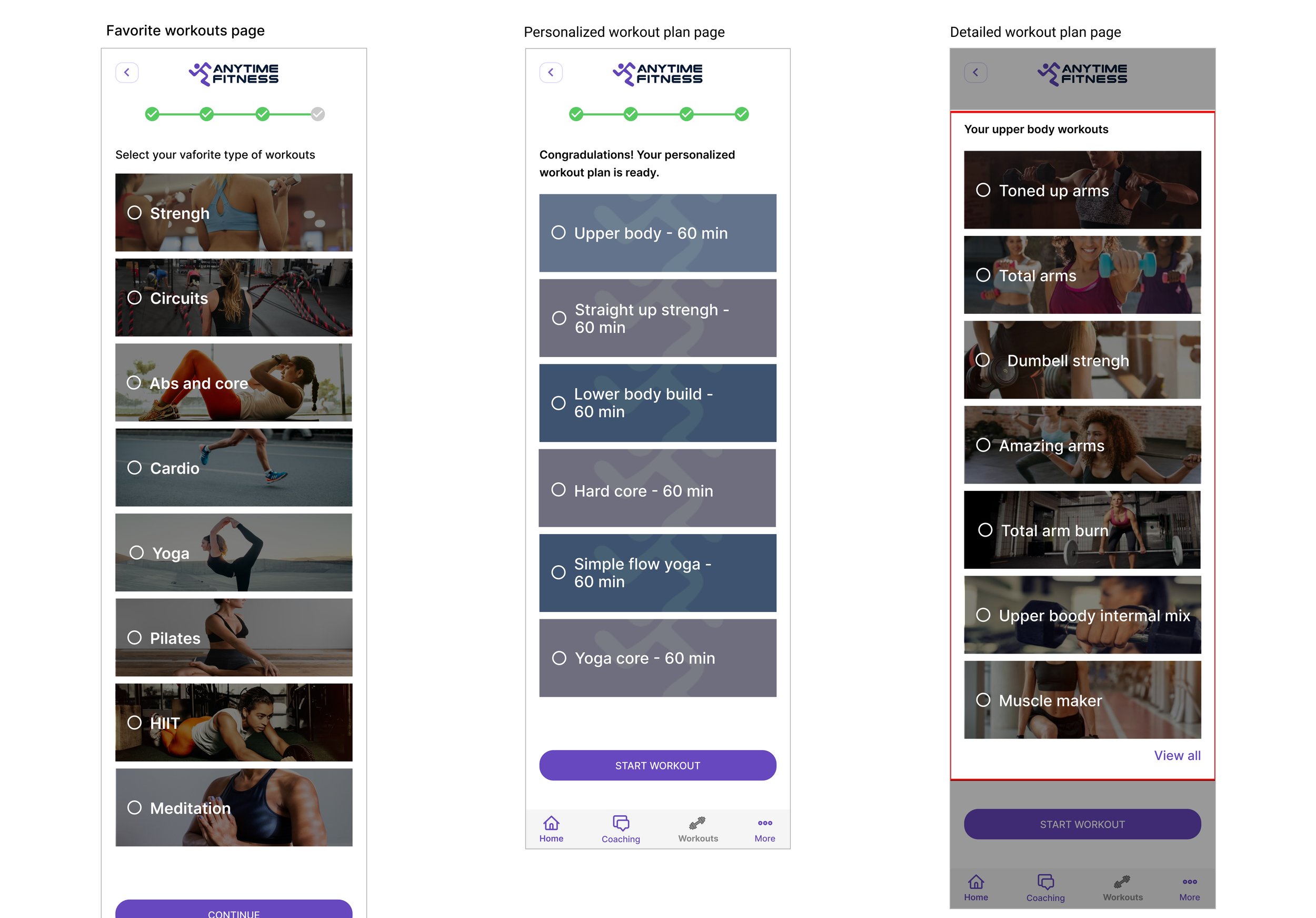
I started this process by creating the frames already built in the app. Then I had to find the optimal location to place the feature to fit seamlessly within the original design. I needed to design the home screen, gym location, about the user page, fitness level page, favorite workouts, personalized workouts, and video and written workouts page. Once this was completed, I was able to start on the new feature. The optimal location for the real-time member tracker was on the gym location page. Users could easily track the location and the gym capacity on the same page.

PROTOTYPE
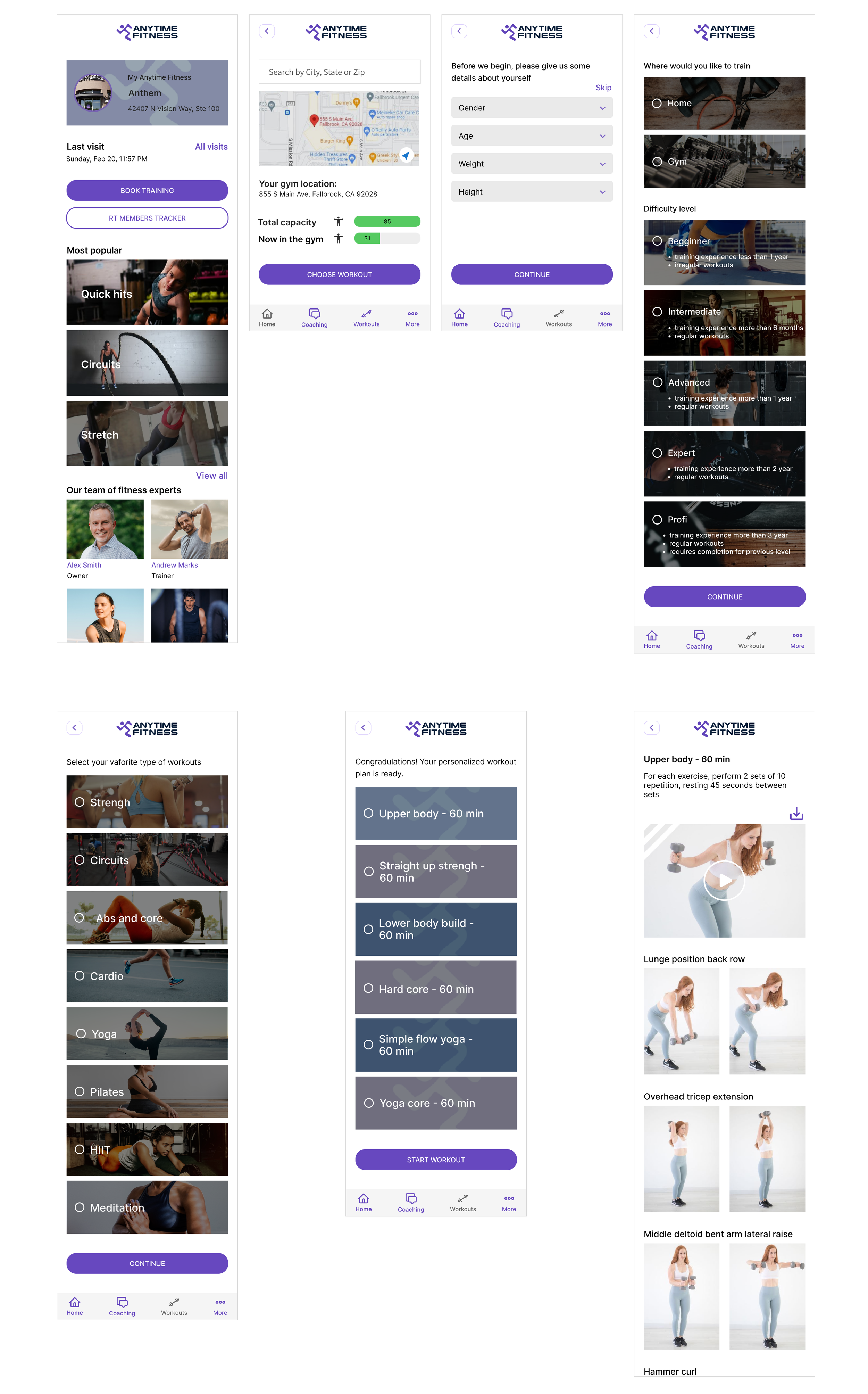
Set of high fidelity screens
Using the Anytime Fitness UI Kit, I completed high-fidelity wireframes. I created the original Anytime Fitness screens leading up to the new feature and the feature screens. It is important for the users to track how many people are in the gym in real-time to choose the most convenient time for their workouts. Also, using a personalized workout plan would help determine the most appropriate activity for users.

USABILITY TESTING
Test Objectives:
Determine if users can complete tasks
Observe how users navigate the app
Identify pain points and frustrations
Methodology
In-Person: one-on-one testing using a laptop and Figma prototype
Remote: one-on-one testing with screen share and Figma prototype
Test Findings
The usability test was conducted with four users 26 - 36 years old. Each participant was asked to complete the following task: find out how many people are in the gym, go through the app, and select a personalized workout plan.
Participants were able to complete the task given with the limitation of the prototype.
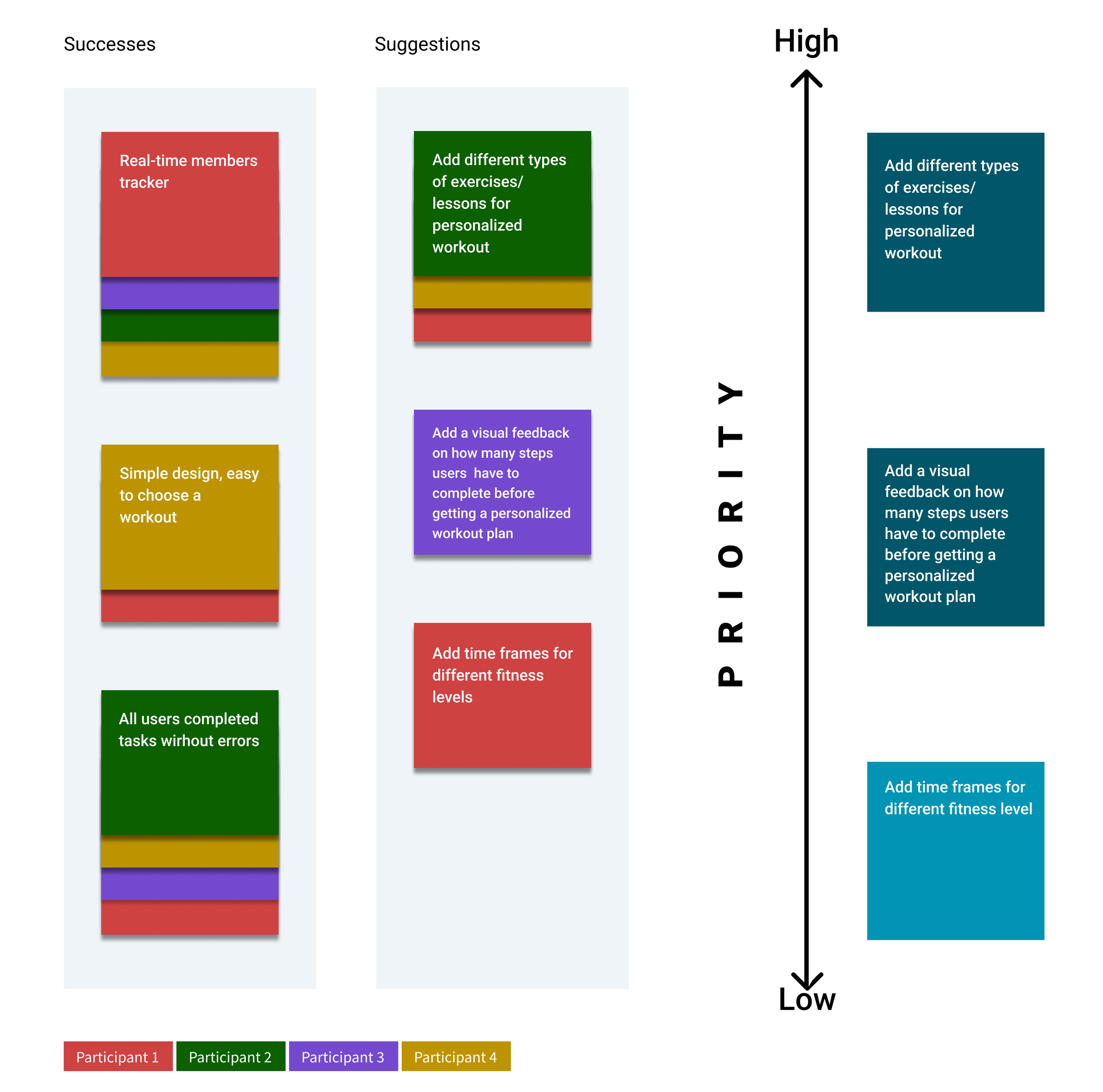
Participants completed tasks without errors. 100 % of participants gave positive feedback about the new feature - RT members tracker. The test showed that there are two high-priority tasks to be resolved. Some of the users' suggestions could be implemented in the future based on business needs and priorities.
Two High Priority Tasks That Have To Be Solved By:
Add a visual feedback/progress bar on how many steps users have to complete before getting a workout plan
Create a detailed workout plan
Affinity Map - Anytime Fitness

Priority Revisions
Revisions were made based on the usability test findings. The following
information was added:
progress bar
detailed workout plan


Next Steps:
Conduct additional testing using a modified prototype
Confirm whether adding the progress bar and the detailed workout plan improves the user experience
Iterate based on the feedback